
 EN
EN
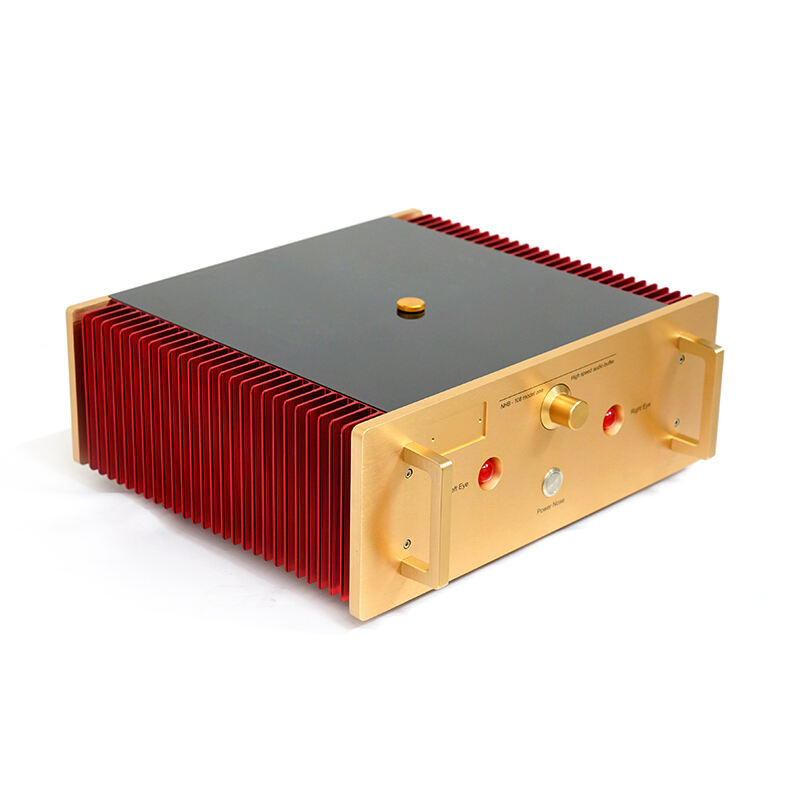
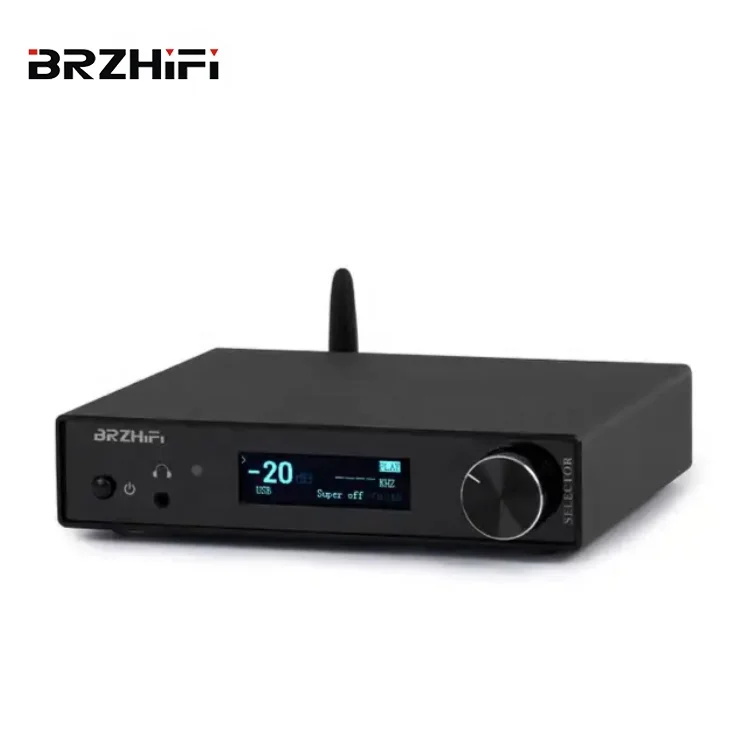
Современите ентузијасти за десктоп аудио постојано бараат начини да ја подобрат својата слушна искуство, а еден компонент кој привлече значително внимание е DAC посилувачот. Оваа софистицирана аудио опрема има двојна намена: конвертирање на дигитални аудио сигнали во аналогни и истовремено обезбедување на појачување за управување со слушалки или десктоп звучници. Разбирањето што го прави DAC посилувачот посебно добар за слушање на работна површина бара истражување на техничките предности, практичните бенефиции и специфичните карактеристики кои ги разликуваат висококвалитетните уреди од основните алтернативи.
Технички темели на врвната перформанса за аудио на десктоп
Изузетна конверзија од дигитално во аналогно
Основната функција на било кој уред за дигитално-аналогна конверзија и појачување се состои во неговата способност да ги претвора дигиталните аудио стримови во аналогни сигнали со минимални деформации и максимална верност. Висококвалитетните десктоп уреди обично користат напредни чипови за ДАК како што се AK4499, ESS Sabre серијата или Burr-Brown компоненти, кои нудат извонреден однос сигнал-шум и ултра-низка вкупна хармониска деформација. Овие премиум конвертери можат да справуваат со аудио формати со висока резолуција, вклучувајќи DSD512, PCM до 32-bit/768kHz и MQA декодирање, осигурувајќи дека секој нјанс на оригиналната снимка ќе стигне до вашите уши со совршена јасноќа.
Процесот на конверзија вклучува софистицирани техники на прекумерно семплирање и алгоритми за дигитална филтрација кои минимизираат артефакти од алјасинг и го запазуваат природниот музички карактер на изворниот материјал. Премиум DAC-амплifikаторските единици често вградуваат повеќе стадија на конверзија, што овозможува на корисниците да избираат различни типови на филтри врз основа на нивните слушачки предпочитувања или карактеристиките на специфичните снимки. Овој степен на персонализација овозможува на слушачите со десктоп системи прецизно да нагласат своето аудио искуство според личниот вкус и акустичните особини на нивната слушачка средина.
Архитектура на појачување и управување со енергија
Сценаријата за слушање на работна компјутерска маса често вклучува разновидност на импеданси на слушалки и нивни осетливости, што ја прави секцијата за појачување на DAC појачалото критично важна за оптимални перформанси. Топологиите на појачување класа A, класа AB и модерните класи D секоја посебно нудат различни предности за употреба на маса. Дизајните од класа A обезбедуваат најтопло, најлинеарно воспроизводство на звук, но произведуваат повеќе топлина и потрошувачка на електрична енергија, што ги прави идеални за подолги сесии на слушање каде управувањето со топлината не е толку критично колку кај преносливите уреди.
Способностите на десктоп DAC-појачалото за испорака на моќност мора да обезбедат поддршка за сѐ, од чувствителните внатрешноушни монитори до планарните магнетни слушалки кои бараат голема моќност. Квалитетните уреди обично нудат повеќе излезни импеданси и поставки за засилување, што овозможува на корисниците да ги оптимизираат карактеристиките на појачувањето според нивните специфични претворачи. Оваа флексибилност гарантира дека слушалките со ниска импеданса добиваат чиста и контролирана моќност без прекумерно засилување, додека слушалките со висока импеданса добиваат доволен напонски опсег за да го достигнат својот целосен динамички потенцијал.
Предности во поглед на поврзување и интеграција
Универзалност на дигитален влез
Современите работни површини бараат широк спектар на можноси за поврзување за да се прилагодат на различни изворни уреди и дигитални аудио формати. Превосходниот DAC-појачувач обично нуди повеќе дигитални влезови, вклучувајќи USB, оптички, коаксијални и понекогаш Bluetooth или можност за безжична стриминг-трансмисија. Поврзувањето преку USB станало особено важно за примената на работните површини, при што многу уреди поддржуваат асинхрони USB-протоколи кои овозможуваат на DAC-от да го контролира времето на пренос на податоците, намалувајќи ја џитерот и подобрувајќи ја вкупната квалитет на звукот.
Примената на галванска изолација на дигиталните влезови помага да се спречат земјени циклуси и електричен шум од контаминација на аудио сигналната патека. Оваа функција станува особено корисна во работни средини каде повеќе електронски уреди делат струјни кола и можат да внесат непожелана интерференција. Моделите на висококвалитетни DAC-амплификациски уреди често вклучуваат напредни функции за превключување на влезови и детекција на извор, автоматски избирајќи соодветен влез врз основа на присуството на сигнал или овозможувајќи рачен избор на извор преку контроли на предниот панел или преку далечинско управување.
Конфигурација и надзор на излезот
Работните аудио-поставки имаат предност од флексибилните опции за излез кои овозможуваат истовремена врска на повеќе уреди за слушање. Многу квалитетни DAC-амплитудни единици обезбедуваат како еднострани така и балансирани излези за слушалки, како и линиски излези за врзување на активни монитори или традиционални звучни амплитудери. Оваа конфигурација овозможува на корисниците лесно да преминуваат помеѓу различни сценарија за слушање без постојано повторно поврзување на кабли или прилагодување на системските поставки.
Напредните функции за надзор, како што се реалновременскиот приказ на честотите на семплирање, битните длабочини и нивоата на влезниот сигнал, помагаат на корисниците со работни поставки да потврдат дека нивниот аудио-ланец работи со оптимални параметри. Некои единици вклучуваат спектрални анализатори, VU-мерачи или други механизми за визуелна повратна информација кои го подобруваат корисничкото искуство и обезбедуваат вредни информации за карактеристиките на аудио-сигналот.
Сообразувања за дизајн за употреба на работни поставки
Термичко управување и надежност
Десктоп DAC појачалничките уреди имаат значителни предности во однос на преносливите алтернативи кога станува збор за термален дизајн и избор на компоненти. Поголемата куќишта и стационарната природа на десктоп уредите овозможуваат поефективно распрснување на топлината преку поголеми радијатори, подобро вентилација и понекогаш активни решенија за ладење. Овој термален капацитет овозможува користење на појачани класи A со повисок бијас и посилни излазни секции, без загрижуване за времетраењето на батеријата или премногу генерирана топлина за време на подолги сесии на слушање.
Подобрената термална средина им овозможува на десктоп уредите да користат поголеми, повисококвалитетни компоненти, вклучувајќи преогромни кондензатори за напојување, премиум отпорници и кондензатори за аудио, како и пософистицирани кола за регулација на напонот. Овие компоненти придонесуваат за понизок шум, подобрен динамички опсег и подобро долготрајно работење во споредба со неопходно компактните компоненти користени во дизајнот на преносливи DAC појачалници.
Имплементација на напојување
Еден од најзначајните предности на десктоп DAC-амплитудерските единици е нивната можност да се имплементираат софистицирани дизајни на напојување без ограничувањата што ги поставува работата со батерии. Линеарните напојувања со големи трансформаторски јадра и проширена филтрација обезбедуваат извонредно чисто напојување на чувствителните аналогни кола, што резултира со пониски нивоа на шум и подобри динамички перформанси. Некои висококвалитетни единици користат посебни напојувања за дигиталниот и аналогниот дел, што дополнително го намалува потенцијалот за дигитален превклучувачки шум да ги контаминира чувствителните аналогни патеки на сигналот.
Напредните дизајни на напојници можат да вклучат функции како што се кола за мек старт за заштита на компонентите во текот на секвенците на вклучување, повеќе напонски релси оптимизирани за различни делови на колата и обемна ЕМИ филтрација за спречување на надворешните сметки од влијание врз аудио перформансите. Овие софистицирани имплементации на напојниците би биле непрактични или невозможни во преносливите уреди со батерии, што претставува јасна предност на десктопот dac амплификатор дизајни.
Кориснички интерфејс и контролни функции
Физички контроли и ергономија
Десктоп DAC-појачалата можат да вклучат пообемни физички контроли и елементи на корисничкиот интерфејс во споредба со преносливите алтернативи. Големите, прецизни контроли на јачината на звукот со потенциометри високог квалитет или стапен атenuатори овозможуваат точна регулација на нивото со одлично усогласување на каналите и минимална дисторзија. Дисплејите на предниот панел можат да прикажуваат детални информации за влезните сигнали, работните режими и состојбата на системот, без загриженост за потрошувачката на енергија која ограничува функционалноста на дисплејот кај преносливите уреди.
Поголемиот форм-фактор овозможува интуитивни распореди на копчиња, посебни контроли за често менувани параметри и понекогаш дури и интерфејси со тач-екран за напредни опции за конфигурација. Овој подобрен кориснички интерфејс прави десктоп единиците повеќе погодни за корисниците кои често менуваат поставки или преминуваат помеѓу различни конфигурации за слушање во текот на нивните десктоп аудио сесии.
Далечинско управување и автоматизација
Многу модели на десктоп DAC-појачала вклучуваат комплексни можности за далечинско управување, што овозможува на корисниците да го прилагодуваат звукот, да преминуваат помеѓу влезови и да менуваат поставки од нивната позиција за слушање. Некои напредни единици поддржуваат мрежна поврзаност за управување преку апликација на смартфон или интеграција со системи за автоматизација на домаќинството. Овие функции ја подобруваат удобноста на слушањето на десктопот, отстранувајќи ја потребата од физички пристап до единицата за рутински прилагодувања.
Програмабилните функции, како што се посебните поставки за засилување по влез, персонализирани профили на еквалайзер и автоматско управување со напојувањето, помагаат да се оптимизира искуството од слушање на десктопот според различните извори на содржина и личните предпочитанија за слушање. Стабилната десктоп средина и постојаната достапност на напојување овозможуваат овие напредни функции да работат доверливо, без ограничувањата во потрошувачката на енергија и комплексноста кои ги ограничуваат сличните функции во преносливите дизајни на DAC-појачала.
Оптимизација на перформансите за десктоп средини
Акустичка изолација и контрола на вибрациите
Инсталациите на десктоп овозможуваат софистицирани мерки за механичка изолација и контрола на вибрациите, што значително може да го подобри перформансот на DAC-појачалото. Тешката конструкција на шасито со внатрешни материјали за пригушување помага да се намалат механичките резонанци кои можат да модулираат чувствителни аналогни кола. Изолациони нозе, посебни стапи за опрема или платформи за апсорбирање на вибрации дополнително ја минимизираат трансмисијата на надворешни вибрации кон аудио колата.
Стационарната природа на десктоп поставките исто така овозможува употреба на повеќе чувствителни техники за механичка изолација, како што се магнетна левитација или пневматски системи за изолација кај најкритичните применувања. Овие мерки, иако непрактични за пренослива употреба, можат да обезбедат мерливи подобрувања во нивото на бучава и резолуција на деталите кај захтевните десктоп аудио системи.
Оптимизација на животната средина
Инсталациите на десктоп DAC-појачала имаат предност од контролирани услови на околината што можат да се оптимизираат за најдобар перформанс. Стабилните температурни и влажносни нивоа помагаат да се одржат постојаните вредности на компонентите и да се спречат проблемите со кондензација што би можеле да ги засегнат чувствителните кола. Можноста да се постават уредите подалеку од извори на електромагнетна интерференција, како што се компјутерските монитори, бежичните рутери и прекинувачките напојници, овозможува оптимална интегритет на сигналот.
Посебните напојни кола со висококвалитетни контакти и опрема за кондиционирање на напојувањето можат дополнително да го подобрат перформансот на десктоп DAC-појачалата, обезбедувајќи чисто и стабилно наизменично напојување слободно од напонските флуктуации и шумови кои се чести во типичните домашни електрични системи. Овие оптимизации на околината претставуваат значителни предности во споредба со преносливите сценарија за слушање, каде што таква контрола обично е невозможна.
ЧПЗ
Што прави десктоп DAC-појачалата да звучат подобро од преносливите верзии
Десктоп DAC-појачални единици обично остваруваат подобро квалитет на звукот поради нивните поголеми напојни извори, подобра термална управа и компоненти од повисоко квалитет.
Колку е важно избирањето на DAC-чипот во десктоп аудио системите
Иако DAC чипот е важен, имплементацијата и поддржувачката коловрст имаат поголемо значење од специфичниот модел на чипот. Премиум DAC амплификациски единици користат висококвалитетни чипови како AK4499 или ESS Sabre серијата, но дизајнот на напојувањето, аналогната излезна фаза и имплементацијата на дигиталното филтрирање имаат поголем влијание врз квалитетот на звукот. Најдобрите десктоп единици комбинираат одлични DAC чипови со преврсна аналогна коловрст и силна имплементација на напојувањето.
Дали десктоп DAC амплификатор може да подобри квалитетот на звукот од стриминг сервисите
Да, квалитетен десктоп DAC амплификатор може значително да подобри квалитетот на звукот од стриминг сервисите со заобиколување на обично поинфериорните DAC и амплификациски коловрсти што се наоѓаат во компјутерите и мобилните уреди. Дури и компресираните аудио формати добиваат предност од подобро конвертирање и посилен амплификациски сигнал, додека стриминг сервисите со висок квалитет кои нудат безгубочен или аудио со висока резолуција ќе покажат драматични подобрувања преку посебен DAC амплификатор со правилна имплементација.
Кои типови на врски треба да ги ставам предност за употреба со десктоп DAC амплификаор?
За десктоп примени, поставете предност на асинхроната USB врска за извори од компјутер, бидејќи ова обезбедува најдобра перформанса во однос на џитер и поддржува формати со највисока резолуција. Оптичките и коаксијалните влезови се корисни за поврзување на CD плеери, стримери или други дигитални извори. Bluetooth врската со висококвалитетни кодеки како LDAC или aptX HD додава удобност за безжични извори, иако жичаните врски обично обезбедуваат подобро квалитет на звукот за критични слушачки примени.
Содржина
- Технички темели на врвната перформанса за аудио на десктоп
- Предности во поглед на поврзување и интеграција
- Сообразувања за дизајн за употреба на работни поставки
- Кориснички интерфејс и контролни функции
- Оптимизација на перформансите за десктоп средини
-
ЧПЗ
- Што прави десктоп DAC-појачалата да звучат подобро од преносливите верзии
- Колку е важно избирањето на DAC-чипот во десктоп аудио системите
- Дали десктоп DAC амплификатор може да подобри квалитетот на звукот од стриминг сервисите
- Кои типови на врски треба да ги ставам предност за употреба со десктоп DAC амплификаор?