
 EN
EN
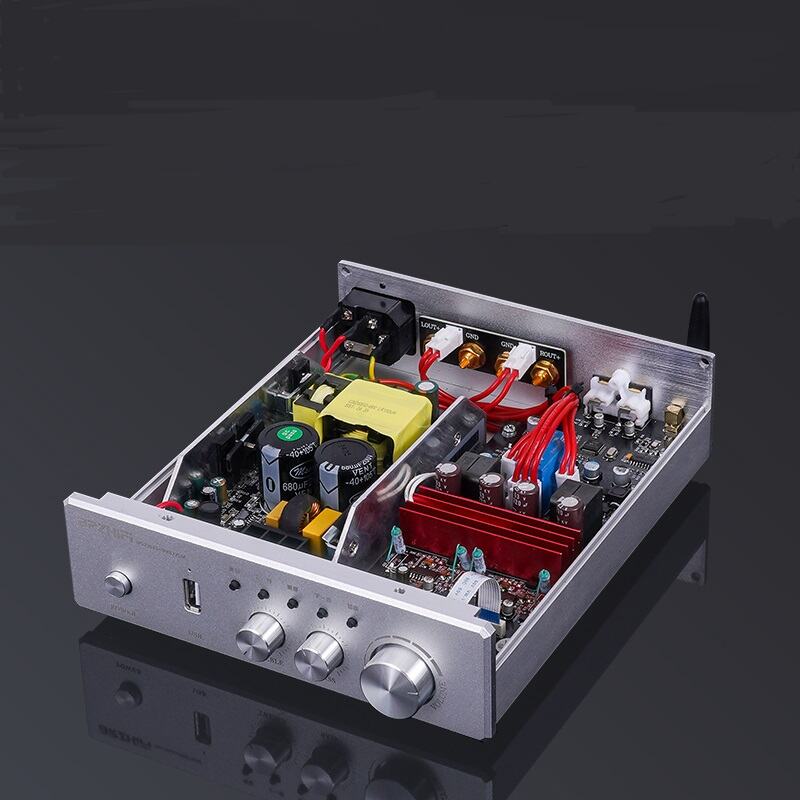
Desktop audio systems have evolved significantly over the past decade, transforming from basic computer speakers to sophisticated setups that rival traditional home theater configurations. Entry-level amplifiers play a crucial role in this evolution, serving as the bridge between digital audio sources and passive speakers. Understanding how these components perform in desktop environments helps audiophiles and casual listeners make informed decisions about their audio investments. The performance characteristics of entry-level amplifiers directly impact sound quality, power delivery, and overall listening experience in compact desktop setups.
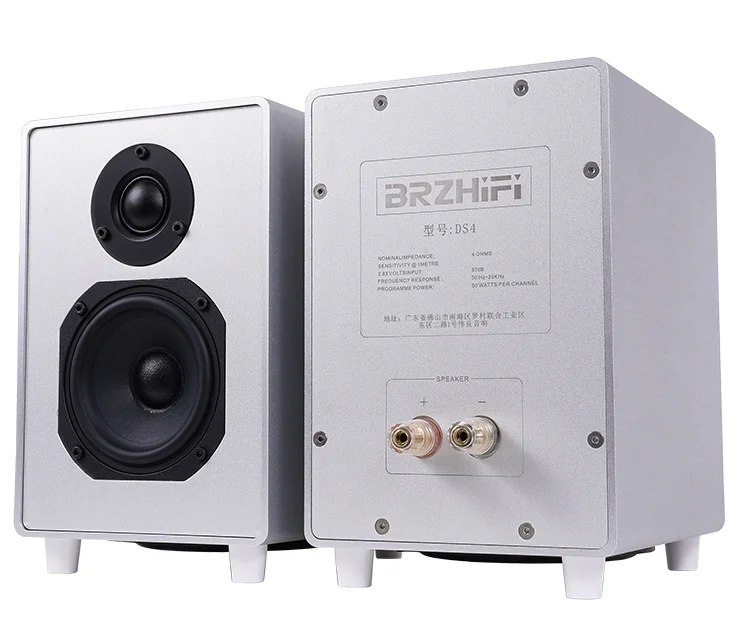
Modern desktop audio enthusiasts demand amplifiers that combine compact design with impressive performance capabilities. Entry-level models must balance affordability with features that satisfy both newcomers and experienced users. The integration of digital inputs, multiple connectivity options, and efficient power management has become standard expectations for desktop amplifiers. These requirements drive manufacturers to develop innovative solutions that maximize performance within budget constraints while maintaining the small footprint necessary for desktop applications.
Technical Performance Characteristics
Power Output and Efficiency Metrics
Entry-level desktop amplifiers typically deliver between 20 to 50 watts per channel, providing sufficient power for most nearfield listening applications. The brzhifi amplifier represents this category well, offering clean power delivery suitable for desktop speakers ranging from bookshelf monitors to compact floor-standing models. Power efficiency becomes particularly important in desktop environments where heat dissipation and energy consumption directly affect user comfort and operational costs. Class D amplification technology has revolutionized entry-level designs by providing high efficiency ratings often exceeding 85 percent.
Thermal management plays a critical role in sustained performance, especially during extended listening sessions common in desktop environments. Modern entry-level amplifiers incorporate intelligent thermal protection circuits that prevent overheating while maintaining consistent power delivery. The relationship between power output and speaker impedance affects overall system performance, with most desktop amplifiers optimized for 4-ohm to 8-ohm loads commonly found in bookshelf and desktop speakers.
Frequency Response and Audio Fidelity
Frequency response characteristics determine how accurately an amplifier reproduces the full audio spectrum from deep bass to extended treble. Entry-level desktop amplifiers generally achieve frequency response ranges from 20Hz to 20kHz with variations typically within 1dB, ensuring faithful reproduction of most musical content. The brzhifi amplifier maintains this standard while providing low total harmonic distortion figures that preserve audio clarity across all frequency ranges. Signal-to-noise ratios in quality entry-level models exceed 90dB, ensuring clean background performance even at moderate listening levels.
Dynamic range capabilities affect how well amplifiers handle sudden volume changes and complex musical passages. Desktop listening environments benefit from amplifiers that can accurately reproduce both subtle details and dramatic crescendos without compression or distortion. The input sensitivity and gain structure of entry-level amplifiers must accommodate various source devices, from smartphones and tablets to dedicated digital audio players and computer sound cards.
Connectivity and Integration Features
Digital Input Processing
Modern desktop amplifiers incorporate multiple digital input formats to accommodate diverse source devices and connection preferences. USB inputs with high-resolution audio support have become standard features, allowing direct connection to computers and mobile devices. The integration of digital-to-analog conversion within the amplifier eliminates the need for external DACs in many desktop setups, simplifying system configuration while maintaining audio quality. Optical and coaxial digital inputs provide additional connectivity options for CD players, gaming consoles, and other digital sources.
Sample rate compatibility affects the amplifier's ability to process high-resolution audio files becoming increasingly common in digital music libraries. Entry-level models typically support standard resolutions up to 96kHz/24-bit, sufficient for most consumer audio content. The quality of internal DAC circuits significantly impacts overall system performance, with better implementations providing improved detail resolution and reduced digital artifacts during playback of various file formats.
Analog Signal Handling
Traditional analog inputs remain important for connecting turntables, tape decks, and other analog sources in modern desktop systems. The brzhifi amplifier includes multiple analog input options with appropriate gain staging for different source types. Input impedance matching ensures optimal signal transfer and prevents loading effects that could degrade audio quality. Volume control implementation affects both convenience and audio performance, with quality potentiometers or digital volume controls providing smooth operation and channel balance across the adjustment range.
Analog circuit design influences the overall sonic character of entry-level amplifiers, with careful component selection and layout optimization contributing to clean signal paths. Ground loop elimination and noise filtering become particularly important in desktop environments where multiple electronic devices operate in close proximity. Proper shielding and circuit design prevent interference from computer monitors, wireless devices, and switching power supplies commonly found in desktop setups.
Desktop Integration and Usability
Physical Design Considerations
Desktop amplifiers must balance performance requirements with space constraints typical of modern workspaces. Compact form factors allow placement on desk surfaces or in equipment racks without overwhelming available space. The physical dimensions and weight of entry-level amplifiers affect placement options and system aesthetics. Heat generation and ventilation requirements influence where amplifiers can be positioned relative to other equipment and workspace boundaries.
Build quality and materials selection impact both durability and electromagnetic interference characteristics important for desktop applications. Aluminum chassis construction provides effective shielding while offering attractive aesthetics that complement modern desktop environments. Control placement and accessibility ensure convenient operation without requiring excessive reach or workspace disruption during normal use. LED indicators and display features provide operational feedback without creating distraction during work or listening activities.
User Interface and Control Options
Remote control functionality enhances convenience for desktop users who prefer to adjust settings without physically accessing the amplifier. The inclusion of remote controls with entry-level models varies, but many users appreciate the ability to make volume and input adjustments from their listening position. Front panel controls should provide intuitive operation with clearly labeled functions and smooth, precise adjustment feel.
Input selection methods range from simple toggle switches to rotary selectors, each offering different advantages for desktop applications. Some amplifiers include automatic input detection that switches between sources based on signal presence, reducing manual intervention during normal use. Standby and power management features help reduce energy consumption while providing quick startup when audio playback begins, supporting environmentally conscious operation in desktop environments.
Performance Optimization Strategies
Speaker Matching and Placement
Optimal performance from entry-level desktop amplifiers requires careful attention to speaker selection and positioning within the available workspace. Impedance matching ensures the amplifier operates within its design parameters while delivering maximum power transfer to connected speakers. The brzhifi amplifier works effectively with a wide range of desktop speakers when properly matched and configured. Speaker sensitivity ratings affect the volume levels achievable with limited amplifier power, making efficiency an important consideration for desktop applications.
Nearfield listening distances common in desktop setups influence speaker selection and amplifier requirements. Positioning speakers at optimal distances and angles maximizes stereo imaging and frequency response while minimizing room interaction effects. Desktop environments often present acoustic challenges including reflective surfaces and irregular room boundaries that affect sound quality. Strategic placement of both amplifiers and speakers can minimize these effects while maximizing the benefits of quality amplification.
System Configuration and Setup
Proper system configuration maximizes the performance potential of entry-level desktop amplifiers through attention to signal chain optimization and interference prevention. Cable quality and routing affect signal integrity, with shorter runs generally providing better performance in desktop applications. Power supply quality influences amplifier performance, with dedicated outlets and power conditioning potentially improving audio quality in environments with electrical noise.
Break-in periods allow new amplifiers to reach optimal performance levels as internal components stabilize through initial use. Regular maintenance including contact cleaning and dust removal helps maintain peak performance over extended operating periods. Understanding the amplifier's thermal characteristics and providing adequate ventilation ensures reliable operation during demanding listening sessions or continuous background music playback typical in desktop environments.
FAQ
What power rating is sufficient for desktop speakers?
Most desktop speakers perform well with 20-50 watts per channel, depending on speaker sensitivity and listening distance. Higher sensitivity speakers require less power to achieve comfortable listening levels, while lower sensitivity models may benefit from additional power reserves. The key is matching amplifier power to speaker requirements while considering the typical nearfield listening distances in desktop setups.
How important is DAC quality in entry-level desktop amplifiers?
DAC quality significantly affects digital audio performance, with better implementations providing improved detail resolution and reduced digital artifacts. While entry-level amplifiers may not feature flagship DAC chips, modern designs typically offer performance adequate for most consumer audio applications. Users seeking ultimate fidelity may consider external DACs, but integrated solutions provide excellent convenience and value for desktop systems.
Can desktop amplifiers drive larger speakers effectively?
Entry-level desktop amplifiers can drive larger speakers, but performance depends on speaker efficiency, impedance, and desired listening levels. Efficient floor-standing speakers may work well with modest amplifier power, while less efficient models might require more powerful amplification. Consider the amplifier's current delivery capability and thermal limits when connecting demanding speaker loads in desktop applications.
What connectivity options are most important for desktop use?
USB inputs provide convenient computer connectivity, while analog inputs accommodate various source devices. Optical or coaxial digital inputs offer additional flexibility for gaming consoles and media players. The specific connectivity needs depend on individual source devices and usage patterns, but USB and analog inputs typically cover most desktop audio requirements for entry-level systems.