
 EN
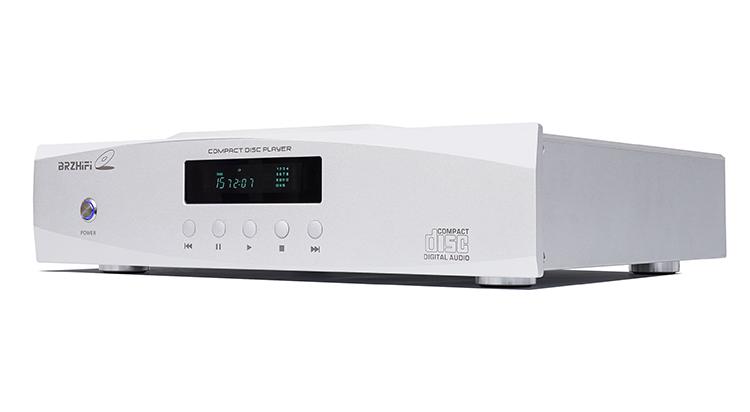
Choosing a cd player for a high-fidelity music playback system starts with how it will connect to the rest of your components. A cd player can provide its own digital-to-analog conversion or send a digital signal to a separate DAC. Decide which role matters in your setup, then assess outputs, disc compatibility, and ease of use. This approach keeps the cd player choice focused on system fit rather than features you may not need.
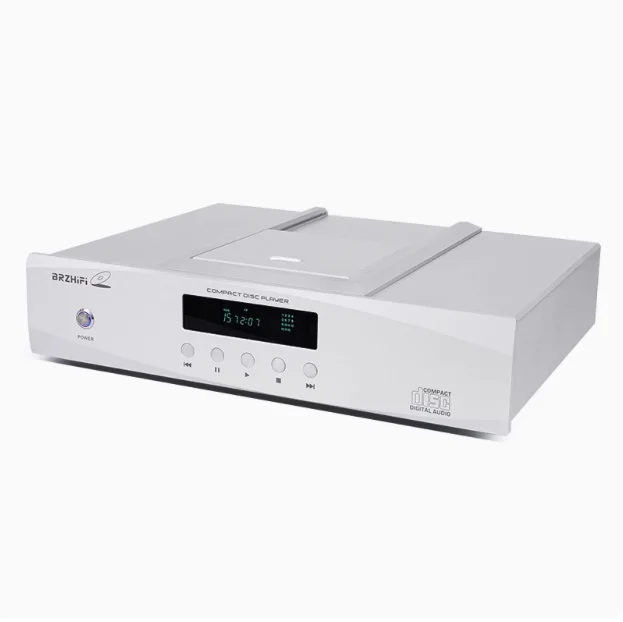
For high-fidelity playback, a cd player should work reliably with your amplifier, DAC, and listening routine. The right cd player is not automatically the one with the most connection options; it is the one that fits the system’s signal path and installation requirements. Consider whether you want a complete source component or a transport for an existing converter. Matching that purpose first makes the remaining comparisons more useful.
Define the CD Player’s Role in Your System
Choose between integrated playback and transport use
An integrated cd player reads the disc and converts its digital information into an analog output for an amplifier. This can simplify a system because the cd player supplies the conversion stage as well as disc playback. A transport, by contrast, sends digital audio onward to an external DAC. Choose an integrated cd player when you want fewer separate components; consider a transport when an existing converter is central to your system.
Before selecting a cd player, trace the signal route from disc to speakers. If the amplifier has suitable analog inputs and you prefer a direct connection, the player’s analog stage will be part of everyday use. If a standalone DAC already handles conversion, confirm that the cd player offers a compatible digital output. Defining the role this way prevents paying for duplicated functions and helps the cd player complement equipment you already own.
Match connections to actual components
Connection labels matter only when they match the receiving device. Check whether the amplifier accepts the cd player’s analog outputs, or whether the DAC supports the proposed digital connection. A cd player with balanced outputs may suit equipment that has matching balanced inputs, while another system may use unbalanced connections without issue. Verify connector type and the signal each port carries instead of assuming that more sockets mean better compatibility.
Also consider cable routing, rack position, and access to controls when choosing a cd player. Balanced outputs can be useful in a system designed around balanced connections, but they do not make every setup automatically superior. For a digital link, confirm that the cd player and converter share a supported input format. A simple connection plan reduces setup errors and gives the player a practical place in the listening chain.
Evaluate Playback and Conversion Needs
Assess the DAC and output options
If you plan to use analog output, the cd player’s built-in conversion and output stage are directly relevant. Review the specifications to understand the available outputs and supported signal formats, then consider whether they suit your amplifier. A cd player used as a transport has a different priority: its digital output must connect properly to the chosen DAC. In either case, evaluate the complete path rather than judging one specification in isolation.
Do not assume that an external DAC will improve every system or that an internal DAC is inadequate. The best arrangement depends on equipment compatibility, preferred operation, and listening priorities. Compare how each cd player configuration would be connected and controlled in real use. If you already own a capable DAC, a digital-output cd player may keep the system consistent; if not, integrated conversion may provide a simpler starting point.
Check discs, controls, and everyday operation
Confirm which disc formats you actually use before buying a cd player. Standard audio CDs are the central requirement for many listeners, while support for other disc types varies by model. Review the manufacturer’s documentation for compatibility rather than inferring it from appearance or marketing language. A cd player that handles your collection and behaves predictably is more useful than one with unsupported functions you will not use.
Daily usability includes loading, track selection, display visibility, remote control, and access to playback settings. If the cd player will sit inside a cabinet or shared rack, check that the loading mechanism and controls remain accessible. Look for clear documentation on the functions that matter to you. A well-matched cd player should make routine listening straightforward, especially in systems where several source components share one amplifier.
Confirm Practical Fit Before Purchase
Check installation and long-term system compatibility
Measure the shelf and allow for ventilation, cable bends, and access before choosing a cd player. Check the unit’s dimensions and operating requirements against the planned location. A tight fit can obstruct connections or make disc handling inconvenient. Confirm that the cd player can be placed securely and that its outputs can reach the amplifier or DAC without awkward cable routing. These practical checks matter in both home and professional listening rooms.
Think about how the system may change, but do not buy features solely for a hypothetical upgrade. If you expect to add a DAC, choose a cd player with an appropriate digital output; if the system will remain simple, prioritize the connection you will use now. Check input availability on the receiving components as well. This forward-looking review helps the cd player stay useful without making the current setup unnecessarily complicated.
Use a focused decision process
A practical comparison begins with three questions: will the cd player use its own analog outputs, what inputs are available downstream, and which discs need to play? Next, verify output types, format support, dimensions, and controls in the product documentation. This turns a broad search into a short compatibility check. For a system using external conversion, this cd player can be considered by reviewing its listed connections against your DAC and amplifier.
Keep expectations tied to the whole playback chain. A cd player cannot compensate for incompatible inputs, poorly planned placement, or missing cables. Confirm what is included and whether any required accessories must be sourced separately. Then weigh the operating experience alongside technical fit. This method gives buyers a clear basis for comparing a cd player to the needs of their particular high-fidelity system without relying on generalized claims.
FAQ
Should I choose an integrated player or a transport?
Choose an integrated cd player if you want analog output directly to an amplifier and do not need a separate DAC. Choose a transport when an external DAC will handle conversion and has a compatible digital input. Compare the cd player’s outputs with the equipment already in your system. The best choice is the one that supports your intended signal path with fewer unnecessary components.
Do balanced outputs matter in a home system?
Balanced outputs are useful when the amplifier or preamplifier has matching balanced inputs and your system is designed to use them. They are not a requirement for every high-fidelity setup. Check the cd player’s output type and the receiving component’s inputs before deciding. A cd player connected through compatible analog outputs can suit a system even when balanced connections are not available.
What should I verify before ordering?
Confirm disc compatibility, output connections, dimensions, controls, and the intended connection to your DAC or amplifier. Read the cd player’s specifications and documentation, especially if your setup depends on a particular digital input or analog connection. Check the installation space and included accessories too. These steps help ensure the cd player is suitable for your collection and high-fidelity playback system.